Wednesday, September 8, 2021

Performance Speed using VPN connection


Using a VPN (Virtual Private Network) can have a significant impact on your internet speed, and the effect it has largely depends on various factors, including the VPN service provider, server location, your internet connection, and the encryption level. Here's how VPN usage can affect your internet speed:


Server Location: The distance between your physical location and the VPN server's location plays a crucial role in speed. Generally, connecting to a server closer to your physical location will result in better speed. If you connect to a server on the other side of the world, you may experience slower speeds due to increased latency.


VPN Provider: The quality of the VPN service provider matters. Premium VPN providers often have faster servers with better infrastructure and can manage more users without a significant drop in speed compared to free or less reputable VPN services.


Encryption: VPNs encrypt your internet traffic for security purposes. The level of encryption used can affect your speed. Stronger encryption provides better security but can be more resource-intensive, leading to slower speeds. Many VPNs offer a balance by allowing users to choose encryption levels.


Network Load: The number of users on the same VPN server can impact speed. If many people are using the same server simultaneously, it can slow down your connection. Premium VPN providers typically have better capacity to handle high loads.


Your Internet Connection: Your original internet speed before connecting to a VPN plays a significant role. If you have a fast and stable internet connection, the impact of using a VPN might be less noticeable compared to someone with a slower connection.


Protocols: VPNs use different protocols (e.g., OpenVPN, IKEv2, L2TP) to establish connections. Some protocols are faster than others. For example, IKEv2 tends to be faster than OpenVPN.


Device Performance: The speed impact can also depend on the performance of your device. Older or less powerful devices may experience more significant speed drops when using a VPN.


ISP Throttling: In some cases, using a VPN can actually improve your speed if your ISP (Internet Service Provider) is throttling your connection for certain activities. VPNs can help bypass such restrictions.


In summary, the impact of using a VPN on your internet speed can vary. In many cases, you may experience a slight decrease in speed due to encryption and routing through the VPN server. However, if you choose a reputable VPN provider, connect to a nearby server, and have a fast internet connection, the speed reduction may not be significant enough to hinder your online activities. It's essential to choose a VPN provider that suits your needs and priorities, whether it's speed, security, or both

Wednesday, June 10, 2020

What is the technical problem if we use vpn+ with encrption equipment using broadband

Using a VPN (Virtual Private Network) along with encryption equipment over a broadband connection is generally a secure way to protect your data and online activities. However, there can be technical challenges or considerations to keep in mind

Performance and Latency:                                                                                                 VPNs and encryption can add overhead to your internet connection, potentially slowing down your network speed and increasing latency. The choice of encryption algorithms and VPN protocols can impact performance.

Compatibility:                                                                                                                             Ensure that your encryption equipment and VPN software/hardware are compatible. Some VPNs may require specific settings or might not work with certain encryption devices.

Configuration Complexity:                                                                                                     Setting up and configuring both the VPN and encryption equipment correctly can be complex. Incorrect settings can compromise security or lead to connectivity issues.

Maintenance:                                                                                                                     Regular maintenance and updates are crucial to ensure that both the VPN and encryption equipment remain secure. Outdated software or firmware can have vulnerabilities.

Cost: High-quality encryption equipment can be expensive, and VPN services often have subscription costs. Be prepared for the financial aspect of implementing these security measures.

Security Risks: While VPNs enhance security, they are not immune to vulnerabilities. Ensure that your VPN software/hardware is up to date and that you follow best practices for VPN security.

Network Configuration:                                                                                                 Properly configuring your network to work with both VPN and encryption equipment can be challenging. Consult with experts or follow vendor guidelines to ensure a secure setup.

Legal and Compliance Issues:                                                                                                 Depending on your location and the nature of your activities, there may be legal or compliance issues to consider when using encryption and VPNs. Be aware of any local regulations.

Interoperability: Ensure that all your devices and software can work seamlessly with the VPN and encryption equipment. Compatibility issues can lead to disruptions.

Scalability:                                                                                                                                     If you plan to expand your network or add more users/devices, consider how well your VPN and encryption solution can scale to accommodate increased traffic and security requirements.

In summary, using a VPN along with encryption equipment over a broadband connection can significantly enhance security, but it's essential to plan, configure, and maintain these technologies correctly to avoid technical problems and security risks. Consulting with IT professionals or experts in network security may be advisable to ensure a robust and secure setup.


Tuesday, May 5, 2020

Discover the Ultimate Online Security Solution: Virtual Private Networks (VPN)


 In today's increasingly digital world, the need to safeguard our online activities has become paramount. Whether you're an entrepreneur, an online shopper, a student, or simply an internet enthusiast, your online security and privacy should be a top priority. This is where virtual private networks, or VPNs, come into play.

So, what exactly is a VPN? A VPN is a service that encrypts your internet connection, adding a layer of security and privacy. It acts as a secure tunnel between your device and the internet, ensuring that your online activities are shielded from prying eyes.

One of the primary functions of a VPN is to mask your IP address. Your IP address is a unique identifier assigned to your device, allowing websites and online services to track and monitor your online activities. With a VPN, your real IP address is concealed, making it virtually impossible for anyone to track your online presence.

Furthermore, a VPN encrypts your internet traffic, making it unreadable to hackers, government agencies, and even your Internet Service Provider (ISP). This encryption technology ensures that all your data, including personal information, passwords, and confidential documents, remains secure while in transit.

Aside from security benefits, VPNs offer numerous advantages. First and foremost, VPNs allow users to bypass geographic restrictions and access content that is blocked in their location. For example, you can access region-locked streaming services or social media platforms while traveling abroad.

Additionally, VPNs enhance your anonymity online by preventing websites and advertisers from tracking your browsing habits. Your privacy becomes an utmost priority, as your data is no longer sold to third parties or utilized for targeted advertising

In terms of network security, a VPN protects you when connected to public Wi-Fi networks. Public Wi-Fi spots are notorious for being vulnerable to hackers and cybercriminals, putting your personal and financial information at risk. By using a VPN, all your data is encrypted, making it nearly impossible for anyone to intercept and exploit your connection.

It's important to note that not all VPN providers are created equal. Secure, reputable VPNs prioritize user privacy and have a strict no-logs policy, meaning they do not store any user activity logs. Trustworthy providers invest in state-of-the-art encryption technology and offer a wide range of servers worldwide to ensure fast and reliable connections.

Get Instant VPN Now


Thursday, April 16, 2020

Surfshark vs. ProtonVPN: which one is for you in 2023?


Comparing VPN providers can be tricky since there may be no noticeable distinctions between them, making it challenging to pick the right one. In this Surfshark Offervs. ProtonVPN comparison review, we will guide you through the benefits and drawbacks of each so you can choose the best VPN for you.

Table of contents

  1. 1. Surfshark vs. ProtonVPN: at a glance
  2. 2. Security
  3. 3. Speed
  4. 4. Features
  5. 5. Server locations
  6. 6. User-friendliness
  7. 7. Pricing & plans
  8. 8. Customer support
  9. 9. Surfshark vs. ProtonVPN: the results 
  10. 10.https://surfshark.hasoffers.com/signup/24611
  11. 11. Surfshark VPN: is it the right fit for you?
  12. FAQ

  13. Surfshark vs. ProtonVPN: at a glance

  1.     *Available in most locations.
  2. After a quick look, it seems that Surfshark and ProtonVPN mainly differ in price, simultaneous connections, and servers.

    Yet, the table above barely scrapes the surface, so the differences between the providers might still be unclear. You must dig deeper into the technical details before deciding whose hands to put your safety in. So let’s dig together!

    Security

    First and foremost, both VPN service providers guarantee complete security as they don’t collect your browsing history or any other related data. That means they don’t keep a record of your online activity. Surfshark is based in the Netherlands, and ProtonVPN’s headquarters are in Switzerland — ideal locations for data protection. 

    Technically speaking, a few intricacies allow us to assess the security section of both VPN providers, one of the most important ones being encryption.


  3. VPN protocols and DNS status

    There is no crucial difference regarding VPN protocols and DNS (Domain Name System) status when comparing Surfshark and ProtonVPN. They both offer WireGuard, OpenVPN, and IKEv2. Also, both VPN providers ensure that your DNS requests will be handled by their private DNS so no one can access them in an unencrypted format.

    Encryption

    From VPN protocols to data encryption, you can see that most of the security features between Surfshark and ProtonVPN are similar. Both providers offer the same VPN protocols, Kill Switch, and use robust AES-256 (Advanced Encryption Standard) encryption.

    Data encryption

    Along with AES-256 encryption, Surfshark and ProtonVPN go hand in hand and use ChaCha20 encryption for the WireGuard protocol.

    Both encryptions are very similar, but the main difference is that AES-256 divides data into blocks, whereas ChaCha20 ciphers each bit of data separately. Hence, some consider the latter to be faster, although the differences in speed and complexity are minor.

    Encryption key

    ProtonVPN uses a 4096-bit version of the RSA (Rivest-Shamir-Adleman) encryption key, but the 2048-bit version is already secure enough. The RSA-2048 bit key would take approximately 300 trillion years for an ordinary conventional computer to crack.

    The length of the key affects how much processing is required to read it by the server. So doubling the number of bits to add that extra layer of protection brings one drawback — speed.

    Closing thoughts on security

    Surfshark and ProtonVPN guarantee strong and unbreakable encryption to protect your online activities and data.

    Speed

    Imagine your internet connection was as fast as Lightning McQueen when connected to a VPN. Wouldn’t that be amazing? While your VPN connection speed defeating Chick Hicks would be a unique conversation starter, VPN and car speeds are measured differently (obviously). But let’s press the brake pedal and learn how the VPN speed is measured.

    Have you ever heard of Gbps (gigabits per second) or Mbps (megabits per second)? These measurement units indicate your internet speed.

    Surfshark and ProtonVPN servers offer a speed of at least 1Gbps. Both VPN services also say that in most locations, their server speed can reach 10Gbps. That’s not too bad, considering you only need 3Mbps for video calls and 30Mbps for browsing.

    WireGuard protocol

    As mentioned, both Surshark and ProtonVPN use the WireGuard protocol as they identify it as the fastest.

    How do we know it is the fastest? Well, we carried out many tests using speedtest.net by Ookla. We tested the server speed of both VPN providers across the US, the UK, Australia, and Japan. Our research baseline was 300 Mbps download speed and 250 Mbps upload speed. 

    A few words before the big reveal: speed can differ. It depends on many factors, such as location, device, network, ISP (Internet Service Provider), etc. So let’s move on to the results, shall we?


As you can see, there aren’t any significant differences. Surfshark provided a better download speed, and ProtonVPN’s speed was better for uploads. Interestingly, giving upload speeds up to 12 Mbps in some locations caused setbacks for both VPN services.

OpenVPN protocol

We also tested Surfshark and ProtonVPN servers on the OpenVPN protocol.


Surfshark performed better on both download and upload speeds on the OpenVPN protocol. However, the differences aren’t that significant.

Closing thoughts on speed

Surfshark’s upload speed was faster on both WireGuard and OpenVPN protocols, and its download speed was faster on the OpenVPN protocol. ProtonVPN took the lead on upload speed on the WireGuard protocol.

Features

Apart from serving a VPN’s main purpose — protecting your connection online — both Surfshark VPN and ProtonVPN are packed with additional features under their hood. Truly a cherry on top.

For your convenience, we will briefly explain all the features.


  1. AdBlocker

    Prevents your browsing from ads, trackers, malware, and phishing attempts. Surfshark offers CleanWeb, and ProtonVPN has a NetShield feature — both work as ad blockers.

    Cookie pop-up blocker

    Avoids the annoying cookie consent pop-ups. It is available as a Surfshark browser extension feature. It is not available with ProtonVPN.

    Kill Switch

    Disconnects your device from the internet if the VPN connection drops unexpectedly. Both Surfshark and ProtonVPN offer extra protection through Kill Switch.

    Pause VPN

    Allows pausing the VPN connection for 5 minutes, 30 minutes, or 2 hours. The connection automatically resumes once the selected time ends. It is not available with ProtonVPN.

    Tor over VPN

    Accesses the anonymous Tor network: hidden services and onion sites. ProtonVPN offers particular servers that can reroute internet traffic through the Tor network. Surfshark doesn’t provide such a feature.

    GPS override

    Tricks GPS-enabled apps such as Google Maps, Uber, and Snapchat into thinking you’re elsewhere. Surfshark offers this feature on Android devices. GPS spoofing is not accessible with ProtonVPN.

    P2P servers

    In a P2P (Peer-to-Peer) network, all computers are equal and access all or some part of the same resources and data. P2P sharing is available using both Surfshark and ProtonVPN.

    Stealth

    Allows you to use VPN through network restrictions such as geoblocking or government censorship. Surfshark calls it NoBorders, and ProtonVPN calls it Stealth.

    Split tunneling

    This feature allows you to select particular apps & websites to bypass the VPN tunnel. Surfshark calls it Bypasser, and ProtonVPN sticks to the original title of Split tunneling.

    VPN Accelerator

    Delivers the best VPN speed and a more stable VPN connection. ProtonVPN has built it in all ProtonVPN applications, whereas Surfshark doesn’t support such a feature.

    Private DNS

    Both VPN services can boast about having their own private DNS. It converts domain names into IP (Internet Protocol) addresses. That said, no one, even your ISP and DNS provider, will ever have access to them in an unencrypted form.

    Browser extensions

    Secures your browser only instead of the whole device. Both Surfshark and ProtonVPN offer extensions for Chromium-based browsers (such as Microsoft Edge, Brave, etc.) and Firefox-based browsers.

    IP Rotator

    This feature changes the user’s IP address on the chosen location every 5 to 10 minutes without disconnecting from the VPNProtonVPN doesn’t offer this feature.

    Double VPN

    This function provides you with double encryption. In other words, it makes your connection even more secure by connecting you via two different VPN servers. Surfshark calls it Dynamic MultiHop, and ProtonVPN calls it Secure Core.

    Smart DNS

    Use private DNS while streaming on your smart TV in case it doesn’t support the Surfshark app. Surfshark makes sure to cover even unsupported devices, such as Apple TV. This feature is not available with ProtonVPN.

    With Surfshark, you can enrich your base VPN subscription for an extra price and get the Surfshark One bundle. Use Surfshark Antivirus to protect your devices from viruses and malware, Surfshark Search to perform anonymous and ad-free searches, and Surfshark Alert to protect your accounts against data breaches.

    Closing thoughts on features

    Both VPN services provide a wide variety of additional features, including exclusive features that only one or the other can boast about.

    Server locations

    When using a VPN, you connect to your VPN provider’s available locations to hide your IP address and protect your online connection. If there are more server locations, there are more alternatives for hiding your internet traffic. On top of that, if a service provides more servers in particular locations, you can get less busy traffic, which results in better speeds. Let’s look at how our VPN racers perform in this section.


  2. If we’re looking at servers within specific countries, the most significant difference is in the US. But either provider will work if you use locations in the UK, Australia, Canada, the Netherlands, or Germany.

    Restricted countries

    You have to ensure that your VPN will perform while connecting to or being in a restricted country. Surfshark offers servers in countries known for network and VPN restrictions, such as Uzbekistan. To counter network restriction issues such as geoblocking or government censorship, Surfshark offers the NoBorders feature. If Surfshark’s app notices network limitations, it provides you with a selection of the best servers at that moment.

    As for ProtonVPN, they have implemented alternative routing. If their software cannot connect directly to their servers, it will route your connection through unblockable third-party services. As well as that, they offer a Stealth VPN protocol that also allows you to bypass internet censorship and VPN blocks.

    Closing thoughts on server locations

    Surfshark offers a slightly bigger number of countries, but both VPN services have a significant server count. More servers — less loaded traffic. Both VPN services provide complete lists of server countries, so check that out before choosing the right VPN provider for you.

    User-friendliness

    It’s nice to have a service compatible with all your devices. So, let’s imagine a situation. You get a VPN and spend an evening binging your beloved TV series on your laptop. But your laptop breaks in the middle of the final episode. You try to connect to the VPN on your TV, but nothing happens — you don’t have a VPN app on your TV. You double-check your provider’s website and learn that your VPN is not compatible with your TV. What a bummer!

  3. Compatibility

    The moral of the story is you have to think about the devices you regularly use and the service’s compatibility with them. It will help you make a better decision. 

    ProtonVPN
     Windows
    macOS
    Android
     iPhone/iPad
    Linux
    Chromebook
    AndroidTV
    FireTV
    Chrome
    Firefox
    Edge

    Also, remember that Surfshark doesn’t limit the devices you connect to your account.

    Interface

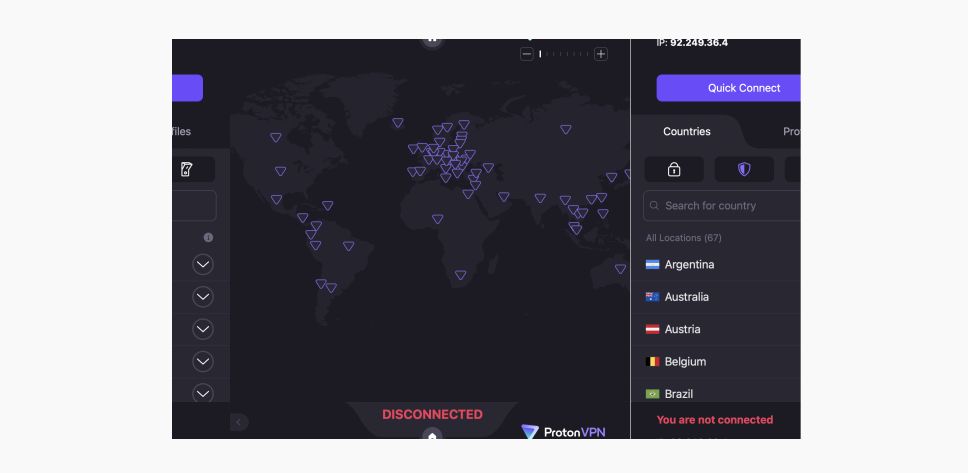
    ProtonVPN’s interface includes a world map and only comes in a dark theme on their app. You can fold up the map and stay with a list of locations. It looks like this:

    Interface

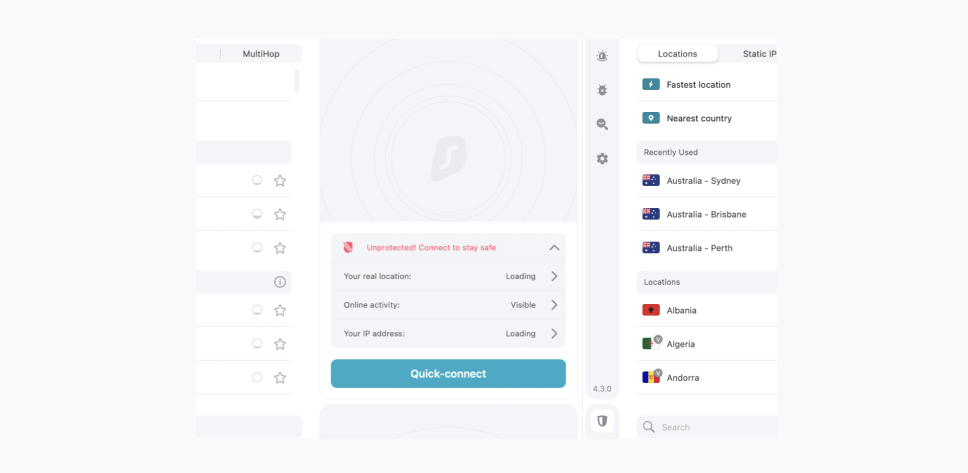
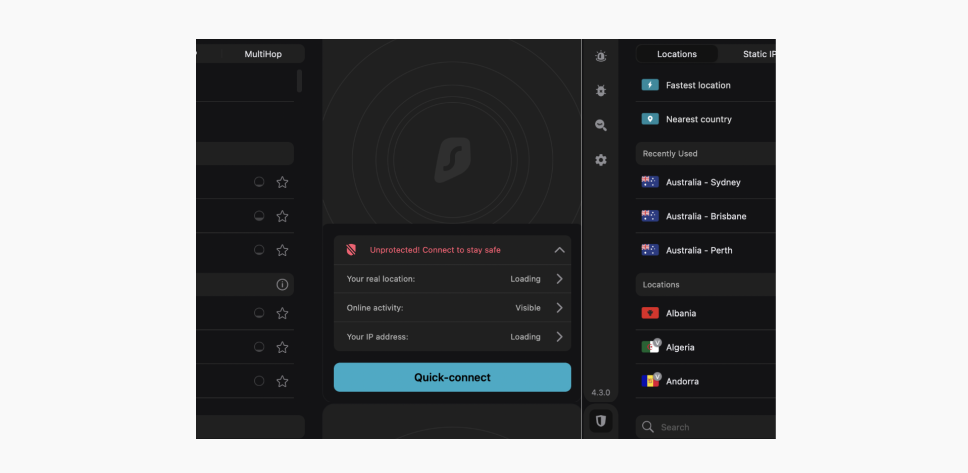
    Surfshark’s interface can be either light or dark. It doesn’t contain any distractions — you can see the complete list of servers, the selected server’s details, and your location information. Pretty handy, right?

    Surfshark’s interface
    Surfshark’s interface dark

    Closing thoughts on user-friendliness

    Both Surfshark and ProtonVPN are compatible with a significant number of devices. However, while Surfshark doesn’t limit the number of connections with one account, ProtonVPN can protect only 10 devices.

    Pricing & plans

    Surfshark and ProtonVPN both offer three plans — a 1-month, 1-year, and 2-year plan. While you can see that ProtonVPN offers a cheaper 1-month plan, Surfshark is more affordable in the long run by providing a more reasonable 2-year plan.

    Plan/Vendor
    Surfshark
    ProtonVPN
    1-month plan
    $16.95/mo
    $9.99/mo
    1-year plan
    $3.99/mo
    $5.99/mo
    2-year plan
    $2.49/mo
    $4.99/mo

    Both VPN services come with a 30-day money-back guarantee. So if you decide to give either service a shot, you can do so risk-free.

    Closing thoughts on pricing & plans

    ProtonVPN offers a cheaper 1-month plan, while Surfshark provides a more affordable plan in the long run.

    Customer support

    How a service takes care of its customers’ needs says a lot about the service itself. That’s why we will also evaluate Surfshark and ProtonVPN customer support.

    Customer service
    Surfshark
    ProtonVPN
    Live chat
    Ticket
    Email
    Call
    Searchable knowledge base
    Video guides
    Average email response time
    3 hours
    58 minutes

    As you can see from the table, ProtonVPN responds faster via email. They accomplish a quick response by pushing a support form for customer inquiries.

    On the other hand, Surfshark offers live chat and YouTube video guides — a lifesaver for quick answers or solutions.

    Closing thoughts on customer support

    Both services provide great online support. ProtonVPN’s email response time is faster, but Surfshark offers a live chat function and video guides.

    Surfshark vs. ProtonVPN: the results 

    Section
    Remarks
    Compatibility
    Both VPN services provide a wide variety of compatible devices. Surfshark offers unlimited connections with one account, while ProtonVPN offers 10 VPN connections by default.
    Interface
    Surfshark has light and dark theme options, and ProtonVPN has an interactive map. A personal choice indeed.
    Speed
    The tests revealed Surfshark offers a higher speed in most locations.
    Security
    ProtonVPN uses an RSA key that provides moderately higher security but decreases the speed. Other than that, the security is similar for both services.
    Features
    Both Surfshark and ProtonVPN offer an extensive selection of unique additional features.
    Server locations
    Surfshark covers more countries. However, both VPN services provide a significant server count.
    Price
    ProtonVPN offers a cheaper 1-month plan, while Surfshark provides a more affordable 2-year plan.
    Customer support
    ProtonVPN responds to queries faster, while Surfshark has a live chat function and informative video guides.

    Surfshark vs. ProtonVPN: the rundown

    Both Surfshark and ProtonVPN offer excellent service. From exceptional speeds and unique additional features to an astonishing number of servers worldwide and economical subscription prices.

    However, it’s not for us to tell you which one is better since it all comes down to your daily needs. You’re in charge of the steering wheel, and deciding where to park in this VPN market is up to you.

    Surfshark VPN: is it the right fit for you?

    If you’ve made it so far in this article and are still trying to decide whether Surfshark VPN is the right choice, take a look at the Surfshark review. It covers the reviews from VPN experts and our users, presents Surfshark benefits and features, and more!

    If that’s not enough and you want to know how Surfshark VPN looks compared to other VPNs worldwide, enjoy our other comparison blog posts, including the following:


VPN for Online Banking

The Ultimate Guide to Using VPNs for Secure Online Banking Introduction In an era dominated by digital transactions and online banking, ens...